Guide · about 7 minutes
Find the pages quietly losing organic traffic, before the rankings go
By the GSC PAP team · Updated
Search Console will show you this if you ask it page by page, with the right two windows, for every page on the site. That is the part nobody does by hand. `find_content_decay` does the comparison across your pages and returns the ones that are actually sliding.
This guide runs the scan, separates real decay from seasonality and SERP changes, and ends with a short ranked list of pages to refresh. If you have been connected long enough to have history past Google's 16-month window, the same scan can run over years instead of months, which is where seasonality finally becomes visible.
What is content decay?
Content decay is a page losing organic traffic gradually, over months, without anything obviously breaking. No penalty, no deindexing, no traffic cliff on a Tuesday. The page simply drifts from position 4 to 6 to 9 while newer pages, fresher data and more direct answers take its place, and the clicks fall a little every month.
It is easy to miss precisely because it is slow. A dashboard showing the last 28 days against the prior 28 reports a 6% dip, which looks like noise. The same page across twelve months has lost half its traffic. By the time it shows up as a problem at site level, the recovery is a rewrite rather than a refresh.
How do I tell decay from seasonality or a Google update?
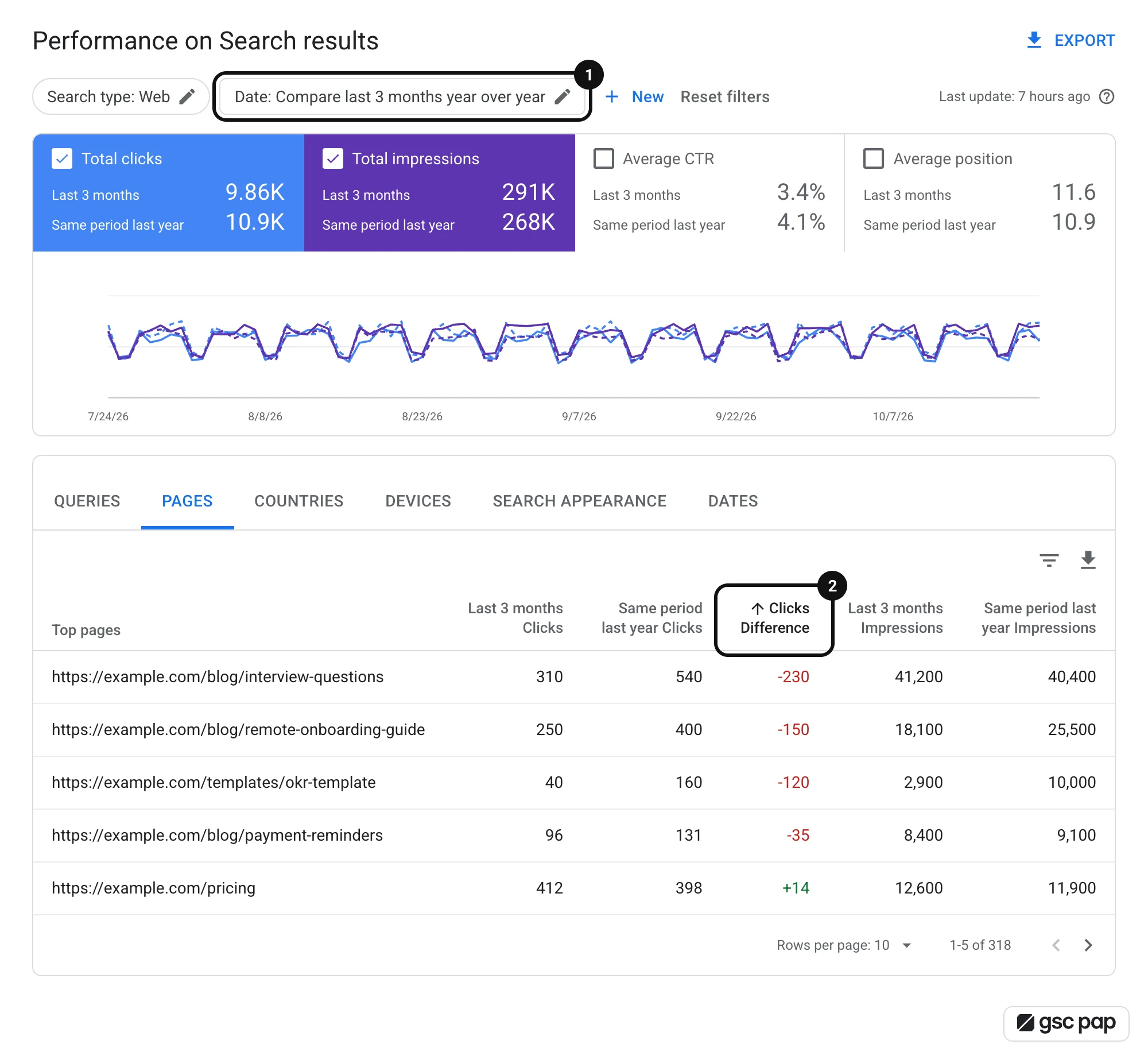
Three checks separate them. Compare the page with the same period last year, not just the prior month, because seasonal queries fall every year on schedule and recover on schedule. Check whether the drop is site-wide or page-specific: an algorithm update usually moves many pages at once, while decay picks off individual pages. And look at impressions next to clicks, because a page losing impressions is losing ranking, while a page holding impressions and losing clicks is losing the click to something else on the result page.
That last distinction decides what you do next. Falling impressions means the page is being outranked and the content needs work. Steady impressions with falling CTR usually means the result page changed around you, not that your page got worse.
- ·Clicks down, impressions down, position down: you are being outranked. Refresh the content.
- ·Clicks down, impressions flat, position flat: the result page changed. Check the SERP features.
- ·Clicks down and up again every year at the same time: seasonality, not decay.
- ·Everything down on the same date across many pages: look at what changed on the site or in the index that week.
Which decaying pages are worth refreshing first?
Not the biggest drop. The biggest recoverable drop. A page that fell from 40 clicks to 10 on a query nobody searches any more is not coming back no matter what you write. A page that fell from 400 to 250 while its query volume held steady is worth an afternoon.
Rank the candidates by what you would gain, not by what you lost: current impressions still arriving, how far the position slipped, and whether the page converts. A decaying page that still converts at 3% deserves attention before a higher-traffic page that converts at nothing.
Finding decaying pages with Claude
The prompt works in any client connected to GSC PAP. Not set up in Claude yet? Connect GSC PAP to Claude
The scenario
Site-wide traffic is flat, which you have decided is fine. Underneath, three pages that used to carry the blog are down 40% since spring, and two new pages are covering for them. Nobody will notice until the new pages stop growing.
The prompt
Use the gsc-pap MCP. For https://example.com, run find_content_decay over the last 6 months and give me the 10 pages losing the most clicks. For each one, show clicks, impressions and average position for the last 90 days against the same 90 days a year ago, using compare_periods. Mark which ones lost impressions (being outranked) and which ones held impressions but lost CTR (the result page changed). Then rank the 5 best refresh candidates by recoverable clicks, and for the top 3 list the queries they used to rank for and have slipped on.What happens
- 1
The scan finds the sliding pages
`find_content_decay` compares each page's recent performance with its earlier performance and returns the ones trending down, rather than the ones that happen to be down this week. A page with one bad fortnight is noise; a page down in three consecutive windows is decay.
- 2
Year-over-year separates decay from seasonality
`compare_periods` against the same window last year is the check that saves you from rewriting a page that simply has a seasonal query. If last year shows the same dip on the same dates, the page is fine and the calendar is doing its job.
- 3
Impressions versus CTR says which kind of problem you have
The split matters: losing impressions is a ranking problem that content can fix, while holding impressions and losing clicks points at the result page. For the second group, a SERP feature audit is the next step, not a rewrite.
- 4
Then it names the queries you slipped on
`get_search_by_page_query` returns the query mix behind one page, so a refresh can be aimed at the queries that actually moved instead of being a general tidy-up of the prose.
What the answer looks like
Which pages are losing organic traffic, and which are worth refreshing first?
find_content_decaylast 6 months, then compare_periods against the same 90 days a year ago| Page | Clicks now | A year ago | Impressions | Position | Loss |
|---|---|---|---|---|---|
| /blog/remote-onboarding-guide | 250 | 400 | -29% | 4.3 to 7.9 | Outranked |
| /blog/interview-questions | 310 | 540 | +2% | 2.1 to 2.3 | Lost CTR |
| /templates/okr-template | 40 | 160 | -71% | 6.0 to 18.4 | Outranked |
Refresh /blog/remote-onboarding-guide first: it still gets 71% of last year's impressions, but it slid from 4 to 8 as newer pages outranked it, so the clicks are recoverable. /blog/interview-questions kept its impressions and position and lost clicks anyway, so the result page changed around it; run a SERP feature audit before touching the copy. /templates/okr-template fell off page one and comes last.
Outcome
A ranked shortlist of pages worth refreshing, each with the reason it is on the list and the queries it lost, instead of a vague sense that the blog is not doing as well as it used to.
Where to take it next
- ·Run the same scan restricted to the pages that convert in GA4, using `correlate_gsc_to_ga4`, so refresh effort follows revenue.
- ·For pages that held impressions but lost CTR, audit the SERP features on their main queries before rewriting anything.
- ·After a refresh, set a reminder to compare the next 28 days with the 28 before the change, so you learn whether refreshes work on this site.
- ·If a page has decayed past recovery and a newer page covers the same ground, consider consolidating them and checking for cannibalization first.
Frequently asked questions
How do I find pages losing traffic in Google Search Console?
Compare each page's recent clicks with its earlier clicks over a long enough window, which Search Console will do one page at a time. To do it across the whole site at once, use a tool that runs the comparison for you: with GSC PAP, `find_content_decay` returns the pages trending down, and `compare_periods` checks any two windows side by side.
How long does content decay take to show up?
Usually months. That is why month-on-month dashboards miss it: a 5% monthly slide reads as noise and compounds into half the traffic over a year. Comparing against the same period a year earlier makes it obvious, provided you still have the data, which Search Console only keeps for about 16 months.
Should I refresh or rewrite a decaying page?
Refresh when the page still ranks and still matches what people search for: update the facts, dates and examples, and answer the queries it slipped on more directly. Rewrite when the search intent behind the query has moved on, or when the page was built for a query nobody uses any more.
Is a traffic drop always content decay?
No. Check three things first: whether the drop repeats every year at the same time (seasonality), whether many pages moved on the same date (an update or a site change), and whether impressions fell with the clicks (a ranking loss) or stayed flat (a result-page change). Only the slow, page-specific, impression-losing kind is decay.
Other guides
All guidesAI queries in Google Search Console: how to tell people, AI Mode and agents apart
Search Console mixes AI Mode follow-ups, AI agent searches and scripts into your query report. How to spot each one, with regex filters and real data.
Good position, no clicks: find the SERP features eating your CTR
Ranking third and getting no clicks usually means something sits above you: an AI Overview, a featured snippet or a map pack. How to check which, query by query.
Traffic changed: how to compare two Search Console periods and find out why
Clicks are down 18% and nobody knows why. How to compare two periods properly, avoid the three traps that fake a drop, and find the queries and pages behind it.
Google Search Console anonymized queries: measure the traffic you can't see
Search Console hides anonymized queries from query rows but counts them in totals. Learn what they are, why no tool reveals them, and how to measure them.
GSC clicks vs GA4 sessions: why they differ and how to tie clicks to conversions
A Search Console click and a GA4 session measure different things. Why the numbers never match, what gap is normal, and how to compare and combine them page by page.
Audit Core Web Vitals across your site with AI
Audit Core Web Vitals with Claude through a hosted PageSpeed Insights MCP server: Lighthouse lab data and real-user CrUX field data for your top pages.
Google Search Console historical data: how to keep it past 16 months
Google Search Console keeps 16 months of historical data, then deletes it. Here is what it includes and how to keep it longer, from BigQuery to an archive.
Build a weekly SEO health report with Claude
Automate a weekly SEO report with Claude: one saved prompt pulls Search Console changes, quick wins, decaying pages, GA4 conversions and Core Web Vitals.
Bulk URL inspection in Google Search Console: diagnose indexing issues at scale
Search Console inspects one URL at a time. The URL Inspection API allows 2,000 checks a day per property. How to inspect in bulk and find indexing issues.
Track keyword rankings in Google Search Console, past the 16-month limit
See a keyword's position history in Google Search Console, what that average really measures, and how to keep ranking history past the 16-month limit.
How to find striking distance keywords in Google Search Console
Striking distance keywords rank just off page one of Google. Find them in Search Console, pick the ones worth fixing, and learn what to change on the page.
How to find keyword cannibalization in Google Search Console
Check for keyword cannibalization in Google Search Console: find queries where your pages compete, judge whether it hurts, and fix the cases that do.